

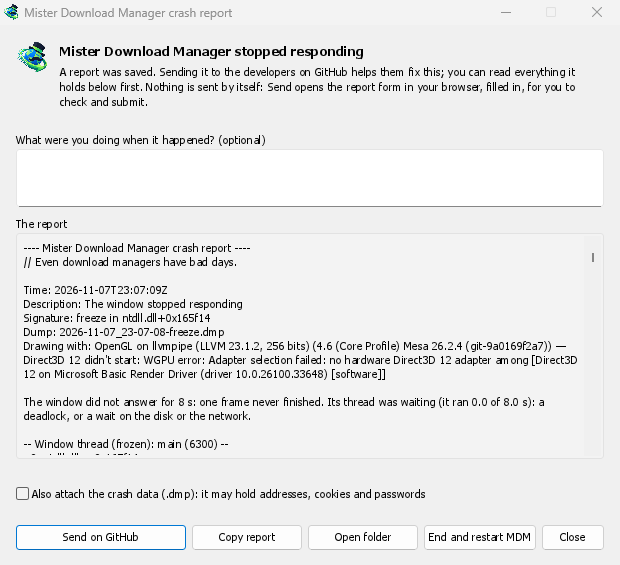
A crash or a freeze doesn't go unnoticed
A second copy of DDM watches the first. When DDM crashes, the report window says Dannex Download Manager closed unexpectedly. When its window hasn't answered for 8 seconds, it says Dannex Download Manager stopped responding, and End and restart DDM closes the frozen copy and starts a fresh one. If DDM comes back by itself, the window says so.
The report names what happened and where in DDM's code, so the problem can be found and fixed. It works on Windows, Linux and macOS.
You read it first, and you send it
Everything that would be sent is in the window, under The report. You can add a few words under What were you doing when it happened?, such as "I opened Add URL".
Send on GitHub opens GitHub's crash report form in your browser, already filled in, with the folder that holds the report. You check it and submit it. That needs a GitHub account. Nothing is sent by itself: there is no background upload and no reporting service, only your browser and GitHub.
If someone already reported the same problem, the window says so and Open the reported issue takes you there, with your report on the clipboard to add as a comment.
What it leaves out
A report holds the error, where it happened, DDM's recent log, and your system: DDM's version, how it was installed, your operating system, the processor, the language and theme, and how many downloads and queues you have, as counts only.
It does not hold your download addresses or file names, and your user name shows as ~ in
folder paths. If an error message quotes something you typed, that text is in it, which is why
you read it first.
The crash data file (.dmp) helps the developers most, but it can hold pieces of what DDM had in
memory, such as addresses, cookies and saved passwords. It is attached only when you tick Also
attach the crash data.
Freeze reports that tell the kind of freeze
A freeze report will say whether DDM's window ran all along (a loop), waited (on a lock, the disk or the network), or hardly ran at all. That last kind usually means a computer too busy to run DDM, most likely not a bug in DDM, and those reports share one signature so they find one issue instead of many. macOS doesn't measure this yet. The window's title will be in DDM's language too, and the report will keep its own lines in every language, left to right in Arabic and Persian.
Free, open source, no ads, no trial.
Download Dannex Download Manager